

S-Rax HD Packing Workstation
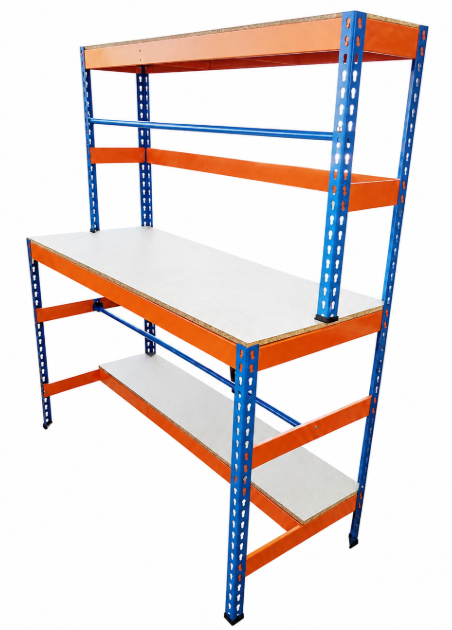
This guide provides step-by-step instructions for assembling components and using your Monster Shop S-Rax HD Packing Workstation.
S-Rax HD Packing Workstation
This guide provides step-by-step instructions for assembling components and using your Monster Shop S-Rax HD Packing Workstation.
Product Information
The Heavy Duty Packing Workstation is designed for professional packing, preparation and workshop applications where a strong, stable and organised work area is required.
Manufactured from durable 1.2mm thick powder-coated steel, this workstation provides a robust structure with a maximum total load capacity of 350kg, including the table board, lower board, upper board and support tubes.
Available in two sizes with a height of 155cm, widths of 150cm or 180cm and a depth of 60cm, this workstation provides versatile storage and packing functionality for warehouses, workshops and industrial environments.
| SKU | 218754 | 218756 |
|---|---|---|
| Height | 160cm | |
| Width | 150cm | 180cm |
| Depth | 60cm | |
| Net Weight | 38.9kg | 46.2kg |
| Gross Weight | 40.7kg | 48.1kg |
| Material | Powder Coated Steel, Chipboard, Rubber | |
| Weight Capacity | Max combined load of 350kg | |
Safety Information
Safety Advice
- Ensure you have read and fully understood the instruction manual and safety advice before using this product.
- This product is intended solely for use as a heavy duty packing and workshop workstation for supporting packaging materials, tools and suitable work items within the stated load limits.
- Do not use this workstation as a climbing platform, seating area, ladder, storage rack for unsuitable materials or for any purpose other than its intended use.
- This product is intended for use by competent adults only. Keep children, pets and unauthorised persons away from the workstation during assembly, loading, use and maintenance.
- The workstation has a maximum total load capacity of 350kg, consisting of the worktop, lower shelf, upper shelf and support tubes. Never exceed the stated load capacity.
- Distribute loads evenly across the work surface and shelves. Do not place excessive weight on one area, edge or corner of the workstation.
- Do not apply excessive side loads, pulling forces or impact forces that could affect stability or damage the frame.
- Assemble the workstation fully in accordance with the supplied instructions before use.
- Ensure all frame components, shelves, support bars, fixings and locking points are correctly installed and securely tightened before loading.
- Position the workstation on a firm, level and stable surface. Ensure all feet are fully supported and the unit cannot rock or move during use.
- Do not use the workstation on uneven, unstable or damaged flooring where tipping or instability may occur.
- Do not modify, drill, weld or alter the workstation structure, as this may compromise strength and safety.
- Inspect all components before assembly and use. Do not use the workstation if any frame section, shelf, fixing or support component is bent, cracked, damaged or missing.
- Replace damaged components before continued use.
- Take care when lifting heavy worktops, packaging rolls, tools or stored materials onto the workstation. Assess the weight before lifting and use correct manual handling techniques.
- Obtain assistance or use suitable lifting equipment when handling heavy or awkward loads.
- Store heavier items on lower shelves wherever possible to improve stability and reduce the risk of falling materials.
- Secure packaging rolls and long materials correctly on the support tubes to prevent movement, falling or impact injuries.
- Do not stack materials beyond the designed storage areas or in a way that could cause items to fall.
- Keep clear of stored items when loading or unloading materials.
- Wear suitable protective gloves when handling steel components during assembly or when moving heavy or sharp-edged items.
- Take care during assembly and adjustment to avoid trapping or crushing fingers between connecting parts, shelves, frames and fixings.
- Keep hands clear of joints, mounting points and moving components during installation.
- Inspect the powder-coated steel surfaces regularly for damage, exposed metal edges or corrosion. Do not use the workstation if sharp edges or structural damage are present.
- Keep the area around the workstation clean, tidy and free from packaging waste, tools and other trip hazards.
- Maintain clear walkways around the workstation at all times.
- Wear close-fitting clothing when using the workstation. Remove loose jewellery and secure long hair to prevent snagging on support tubes, stored materials or protruding components.
- Position frequently used tools and materials within easy reach to reduce excessive stretching, twisting or awkward working positions.
- Take regular breaks during prolonged packing tasks and adjust working methods to reduce repetitive strain or fatigue.
- Do not overload shelves or use the workstation for storing unstable, hazardous or unsuitable materials.
- Do not use the workstation if it has become unstable, damaged or has loose components.
- Carry out routine inspections before each use to check for loose fixings, damage, wear or any other condition that could affect safe operation.
- Keep the workstation clean and dry. Remove dirt, dust, packaging debris and spilled substances that may affect safe use.
- Do not expose the workstation to environments that may cause excessive corrosion or deterioration of the powder-coated finish unless suitable protection is provided.
- Dispose of packaging materials responsibly after assembly to prevent trip hazards and protect children and vulnerable persons from access to packaging components.
- At the end of the product’s service life, dispose of the steel components in accordance with local recycling and waste disposal regulations.
- Keep product identification, model details, manufacturer information and purchase records available to support traceability, product support and any safety-related enquiries.
- Vulnerable users, including individuals with reduced physical capability or limited experience, should only use this product under appropriate supervision and after receiving suitable instruction.
- This product is not intended for use by children.
GPSR Information
UK GPSR Information
Monster House 19-23 Alan Farnaby Way
Industrial Estate Sheriff Hutton
York YO60 6PG
England
+441347878880
Monster House 19-23 Alan Farnaby Way
Industrial Estate Sheriff Hutton
York YO60 6PG
England
+441347878880
EU GPSR Information
Van Heemskerckweg 28A & B
-
Venlo 5928LL
Netherlands
+441347878880
Van Heemskerckweg 28A & B
-
Venlo 5928LL
Netherlands
+441347878880
Included Parts
Monster Manual
Assembly
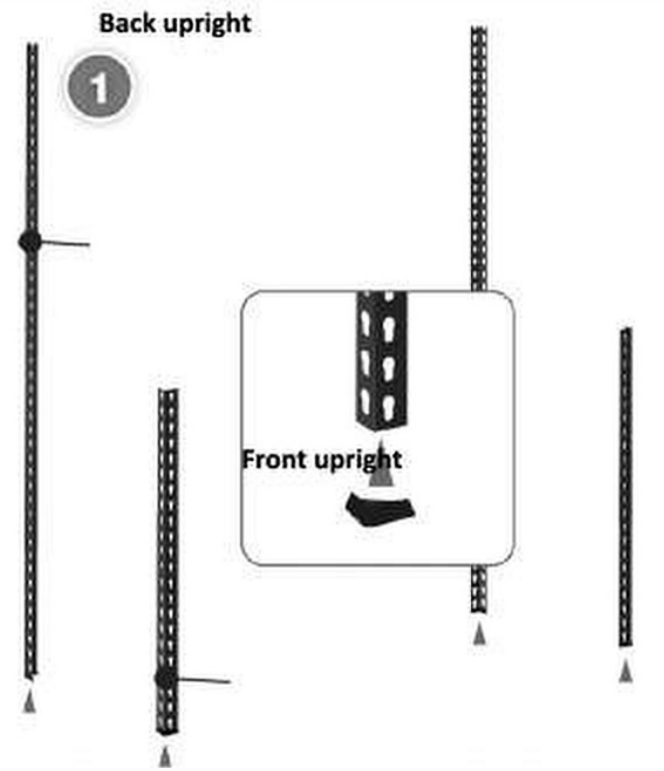
- Attach the rubber feet to the base of the back and front uprights/legs.
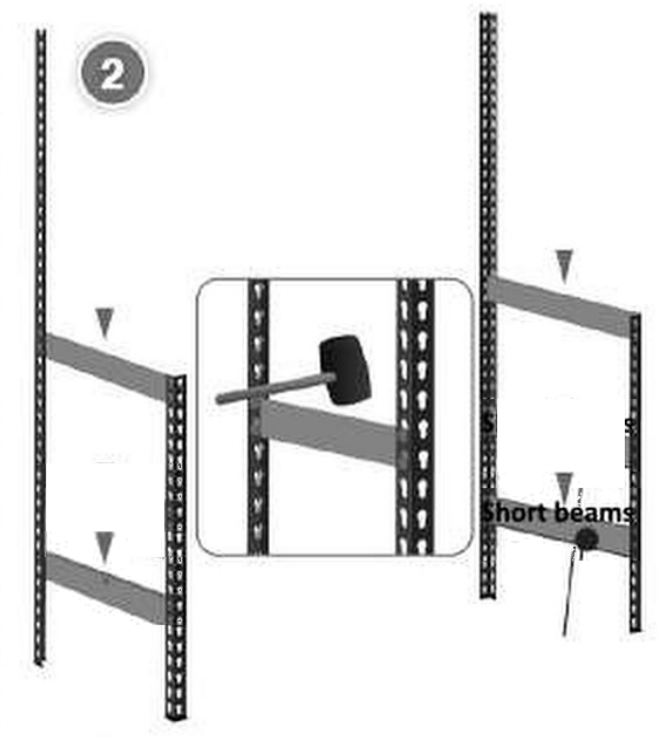
- Connect the front and back uprights using the short beams.
- Secure into place using a mallet.
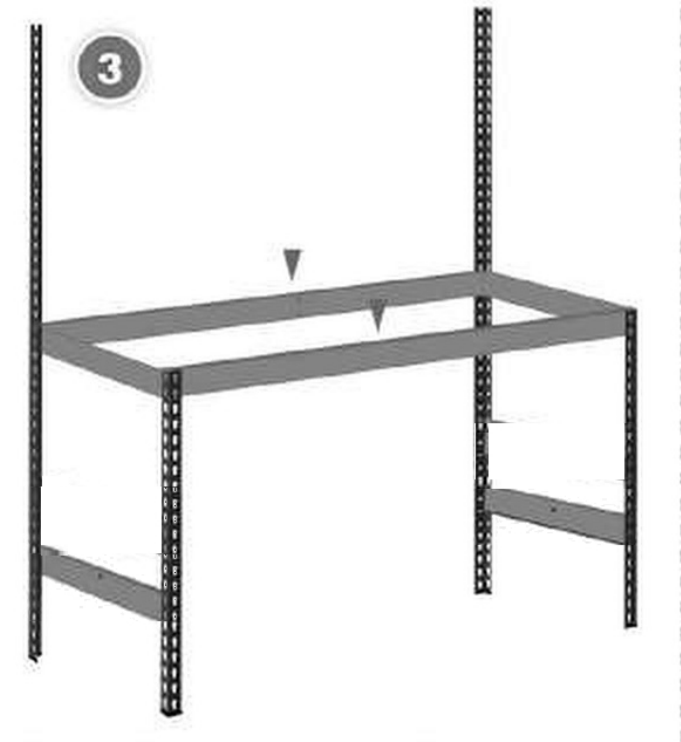
- Connect the left and right sides using the long beams.
- Connect the back uprights in two places, as pictured.
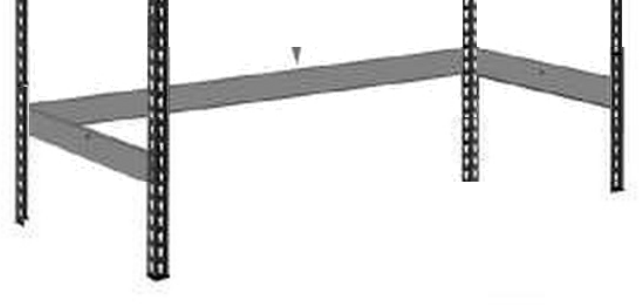
- Insert shelf support beam into the slot in the centre of the long beam
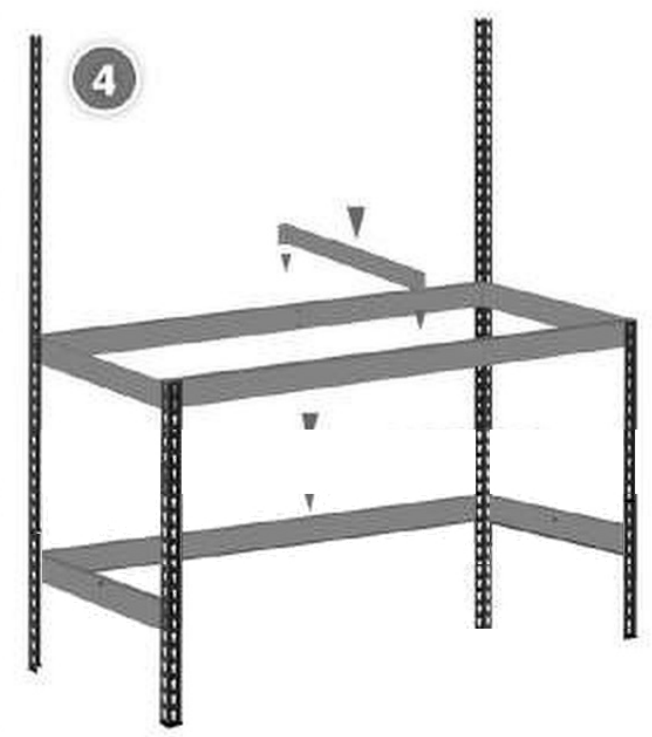
- Place the chipboard worktop onto the shelf support beams, as pictured.
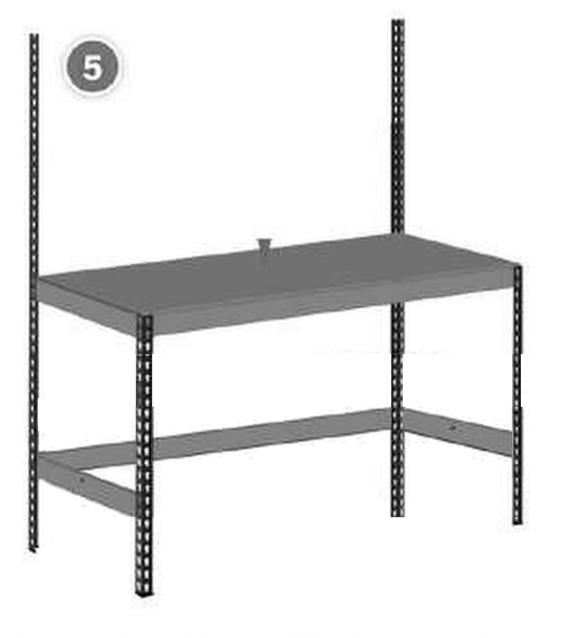
- Attach the uprights/legs on top of the chipboard worktop.
- Insert the short beam into the slot in the uprights/ legs, as pictured.
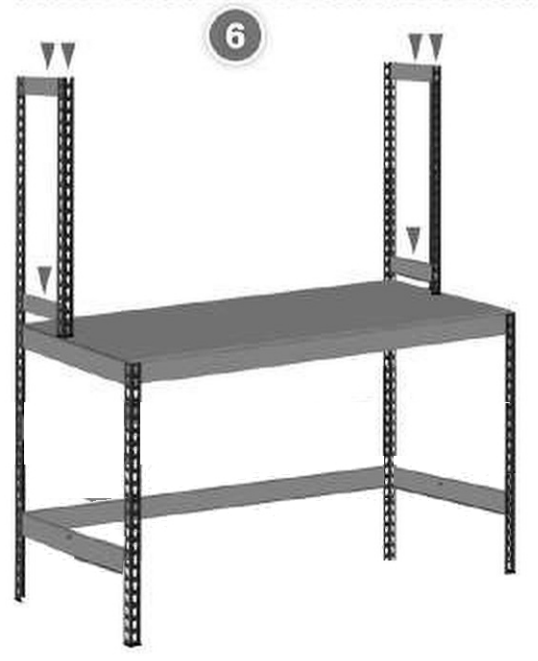
- Attach the long beams to the uprights/legs.
- Insert the shelf support beam into the slot in the centre of the long beam.
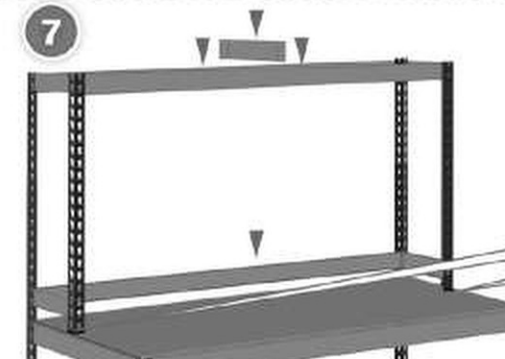
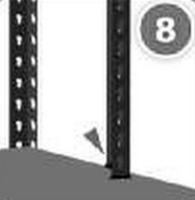
- Attach the pole connectors for the upper shelf as pictured.
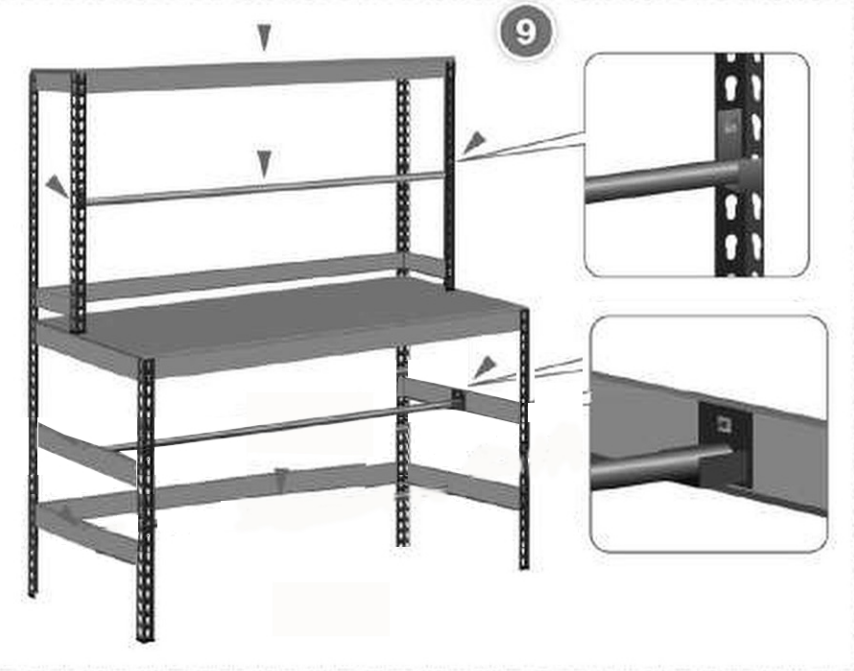
- Attach the pole beams below the worktop.
- Place the blue poles into position, one above the worktop and one below.
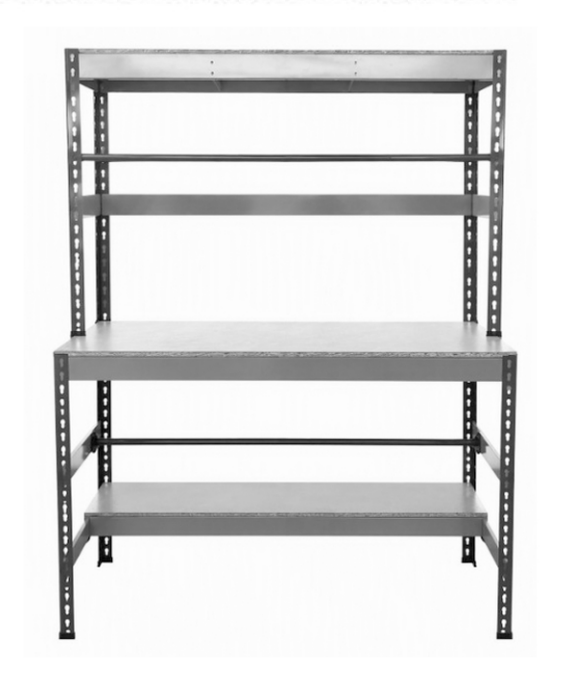
- Place the chipboard upper shelf and chipboard lower shelf into position.
Maintenance
- Regularly inspect the workstation before use for loose fixings, damaged components, corrosion, deformation or signs of excessive loading.
- Check that all bolts, connectors and support components remain securely tightened and tighten where necessary using suitable tools.
- Clean the powder-coated steel surfaces using a soft cloth and mild cleaning solution. Do not use abrasive cleaners or methods that may damage the protective coating.
- Remove any moisture, chemicals or contaminants that could cause corrosion or weaken the finish.
- Replace damaged or worn components immediately and do not continue using the workstation until it has been restored to a safe condition.